
Docker Image Supports Multiple Architectures
Introduction
We’re happy to announce that our official docker image supports multiple architectures! This means that you can run Easy!Appointments with Docker, no matter the environment you are using. In this blog post, you will find out more about the available Docker Image architectures and why providing support for all of them is important.
Available Architectures
Docker images support a variety of architectures, depending on the needs of the application and the hardware it will run on. Here are the primary architectures of Docker images:
- amd64 (x86_64)
- This is the most common architecture, typically used for Intel and AMD processors on standard PCs, servers, and most cloud infrastructure. It is the 64-bit version of the x86 architecture.
- arm64 (aarch64)
- This is a 64-bit architecture used by ARM processors, which are common in mobile devices, some laptops, and increasingly in server environments. ARM64 is also used by Apple Silicon (M1, M2) and the Raspberry Pi 4.
- arm/v7 (armhf)
- This is a 32-bit ARM architecture used by some older Raspberry Pis (e.g., Raspberry Pi 3) and other ARM-based embedded devices. ARMv7 has lower memory requirements and can be efficient for lightweight deployments.
- arm/v6
- This is a 32-bit ARM architecture, primarily used for very lightweight devices like the Raspberry Pi Zero. It’s supported less commonly but can be useful for ultra-low-power, small-memory environments.
- s390x
- This is IBM’s 64-bit architecture for mainframes. It’s used primarily in enterprise environments where IBM mainframes are common.
- ppc64le
- This is the 64-bit little-endian version of IBM’s PowerPC architecture, commonly used on IBM Power Systems servers. It’s useful for certain high-performance computing and data-intensive applications.
- Windows (x86_64)
- Windows-specific Docker images can be built for the x86_64 architecture, primarily to run Windows applications in Docker on compatible Windows Server systems.
Certainly Docker Hub and other registries often contain multi-architecture images, which automatically pull the correct version for the architecture of the system making the request. This is managed by Docker’s “manifest list,” allowing a single Docker image tag to reference multiple architectures.
Multiple Architecture Images
Firstly, with Docker’s Buildx and QEMU emulation, you can build multi-architecture images, enabling compatibility across different architectures in a single image. These images simplify deployment in heterogeneous environments by dynamically selecting the correct architecture.
Easy!Appointments Official Image
In other words, with the release of the multiple architecture images, you will now be able to run the official Easy!Appointments Docker Image on any platform. Easy!Appointments supports the following architectures:
- linux/amd64
- linux/arm64
You can easily start using the latest Docker image of Easy!Appointments by following the guide of the Docker Hub home page.
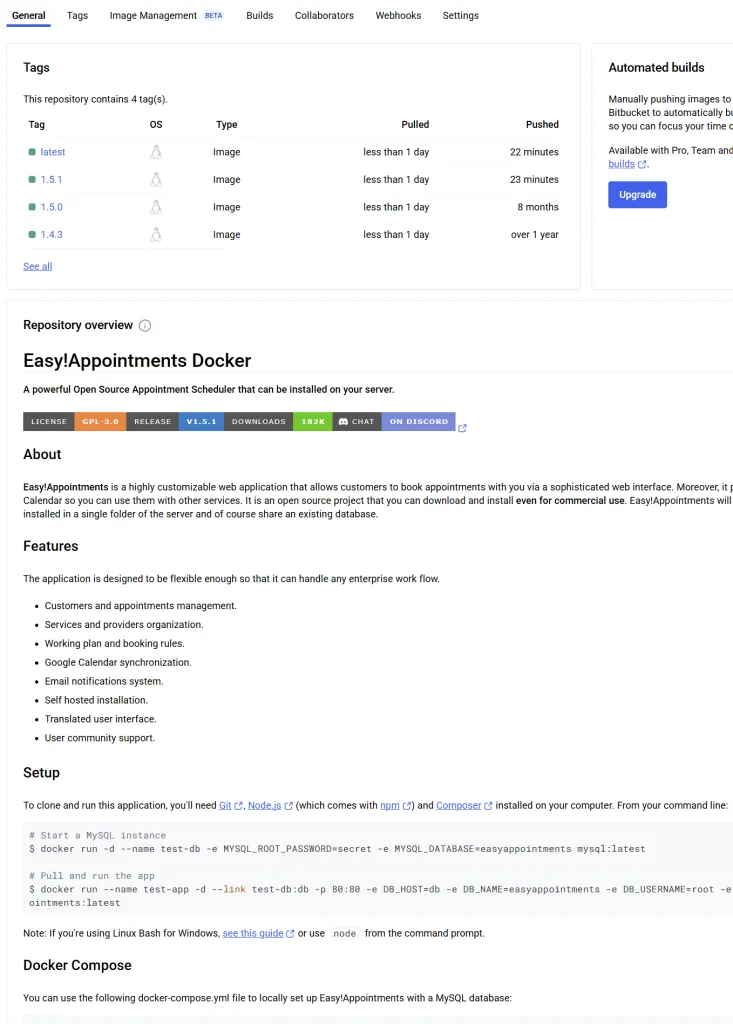
Moreover, the recent Docker image supports SMTP configuration, but this is something that we will cover in more detail in our next blog post, so stay tuned for updates!
Going Premium
Did you read this article, but you’re still not sure on how to proceed?
Reach out to info@easyappointments.org and have an expert take care of everything for you in zero time.
Get your free quote and get started now!
Rather not run it yourself?
Managed Hosting runs Easy!Appointments on our servers or manages it on yours, with updates, backups and a reply from the core team within one business day. White label, support sessions and custom work are in the services.
Get Managed Hosting