
How to Enable Matomo Analytics
Following the previous post on Google Analytics (GA4) support in Easy!Appointments, this article will guide you through on the connection of the greatest Open Source alternative, called Matomo. Matomo, formerly Piwik, is the most common free and open source web analytics application to track online visits to one or more websites and display reports on these visits for analysis. Version 1.5 has first class support for Matomo tracking.
What Is Matomo Analytics?
Firstly, Matomo Analytics is a web analytics platform that just like Easy!Appointments can be self-hosted on your own server. It is an Open Source project and its underlying technology is based on PHP and MySQL, making it a great candidate for any common hosting provider. Just like with Google Analytics, Matomo offers all the main functionality of a web analytics tool:
Real-Time Data:
- Live visitor tracking, including their actions and interactions on the website.
Privacy Protection:
- GDPR compliance, ensuring data privacy and security.
- Option to anonymize IP addresses and respect Do Not Track settings.
Comprehensive Reporting:
- Detailed reports on visitors, including demographics, geography, devices, browsers, and operating systems.
- Customizable and scheduled reports.
Visitor Profiles:
- Detailed visitor profiles with a history of their visits, actions, and conversions.
E-commerce Tracking:
- Tracks e-commerce metrics like product views, cart additions, purchases, and revenue.
Goal and Conversion Tracking:
- Set up and monitor goals, track conversions, and measure the success of marketing campaigns.
Heatmaps and Session Recording:
- Visualize user interactions with heatmaps and record user sessions to see how visitors navigate the site.
Custom Dashboards:
- Create and customize dashboards with widgets for a personalized analytics view.
Event Tracking:
- Track custom events such as button clicks, downloads, and form submissions.
Segmentation:
- Segment data to analyze specific groups of visitors based on various criteria like location, behavior, or referrer.
Tag Manager:
- Manage and deploy marketing tags without needing to modify the website code.
Integrations and APIs:
- Integrates with other platforms and services, and offers robust APIs for custom integrations.
Multi-Site Support:
- Manage and analyze multiple websites from a single Matomo installation.
Mobile App:
- Access analytics data on the go with the Matomo mobile app.
Custom Dimensions and Metrics:
- Create custom dimensions and metrics for more tailored and specific tracking.
Attribution Modeling:
- Analyze the impact of various marketing channels and campaigns on conversions.
Data Ownership:
- Complete control and ownership of your data, as Matomo can be self-hosted.
User Management:
- Role-based access control and user management features.
Enhanced Search Engine Keywords:
- Gain insights into the keywords that drive traffic to your site from search engines.
AB Testing:
- Conduct A/B tests to optimize website elements and improve conversion rates.
How to Enable Matomo Analytics in Easy!Appointments?
Thankfully, Easy!Appointments offers a very straightforward way for you to add your Matomo Site tracking script, without having to change any HTML or hack into the code. In fact, Matomo Analytics is one of the various integrations available for Easy!Appointments and you will find it under Settings > Integrations > Matomo Analytics, from the back-end section.
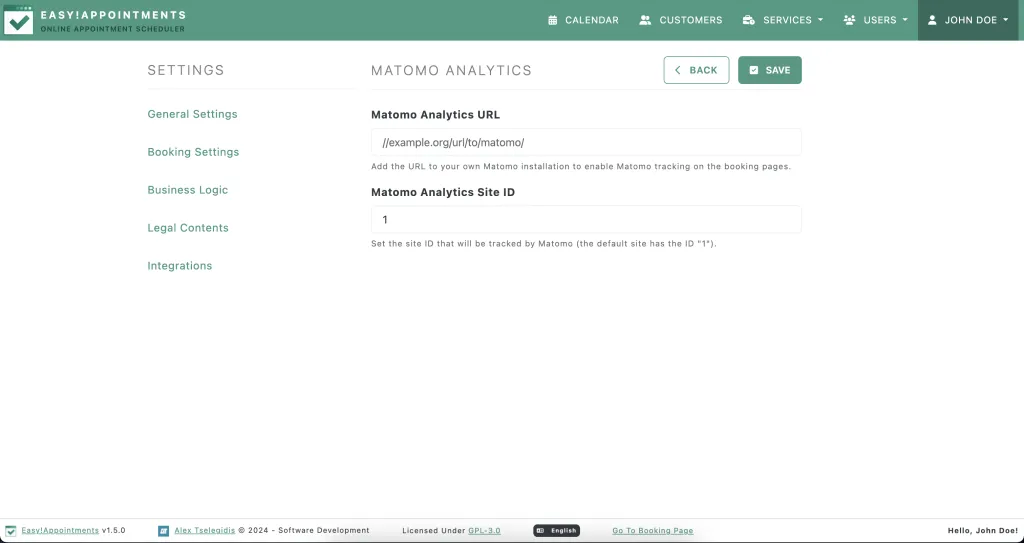
In this settings page you will be able to enter and save the URL to your tracking script and also the site ID you would like to track and that will be automatically applied to all public pages of Easy!Appointments, allowing you to detect all the traffic your booking page has.
Summing up, hopefully this blog post has helped you get started with the Matomo Analytics in Easy!Appointments and allow you to get an overview of how many people are accessing your booking pages.
Going Premium
Did you read this article, but you’re still not sure on how to proceed?
Reach out to info@easyappointments.org and have an expert take care of everything for you in zero time.
Get your free quote and get started now!
Rather not run it yourself?
Managed Hosting runs Easy!Appointments on our servers or manages it on yours, with updates, backups and a reply from the core team within one business day. White label, support sessions and custom work are in the services.
Get Managed Hosting